How I handle original photos and smaller previews in PhotoFlare
Image resizing, srcset, and original downloads, explained using the photographs and conversion script from PhotoFlare.

PhotoFlare is a gallery for my photographs. The original files are useful when someone wants to download a photo, but they are much larger than the pictures shown in the gallery. One JPEG in the project, DSCN0803.jpg, is about 12.4 MB. Sending that file for a small gallery tile would make a page of photographs expensive to browse.
I kept the originals and generated smaller copies for display. Here is how that arrangement works, and how to choose which copy a browser should load.
Start with the file you need to preserve
The original JPEG stays unchanged. A conversion script creates WebP files at widths of 320, 480, 640, 800, 960, 1200, 1600, and 1920 pixels. The script uses quality 80 and encoding method 6. For each photograph, there is one original and eight display versions.
For the photograph at the top of this page, these are three of the stored files:
| File | Width | Size |
|---|---|---|
DSCN0803.jpg | Original | 12.41 MB |
DSCN0803_960.webp | 960 px | 177 kB |
DSCN0803_1920.webp | 1920 px | 546 kB |
These are decimal file sizes from the repository. The smaller copies have fewer pixels as well as a different encoding, so the reduction is not all due to WebP.
A 960-pixel copy takes about 1.43% of the original’s storage. For a gallery tile, that is a useful saving. It says nothing about how many milliseconds the page will take to load; that also depends on the connection, caching, and the other images on the page.
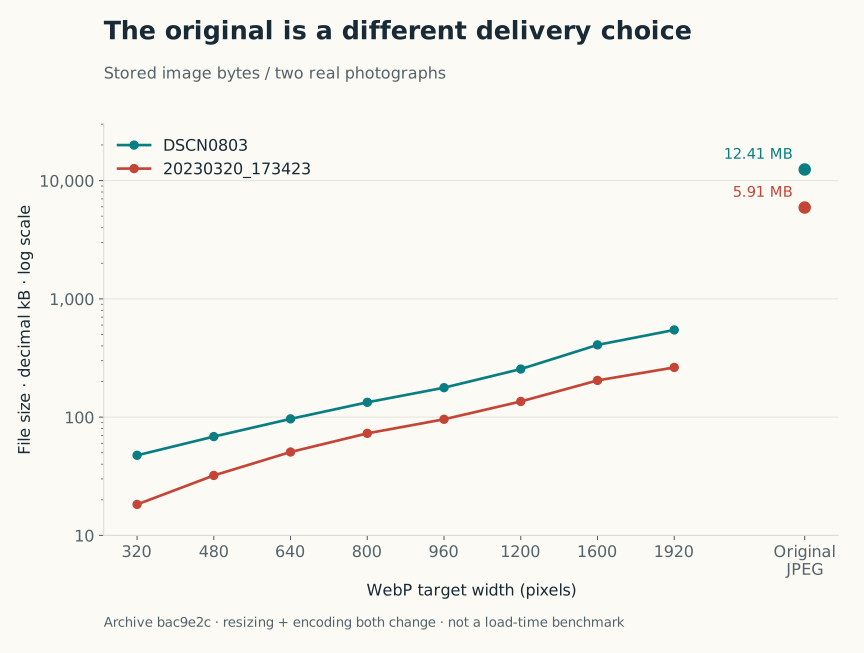
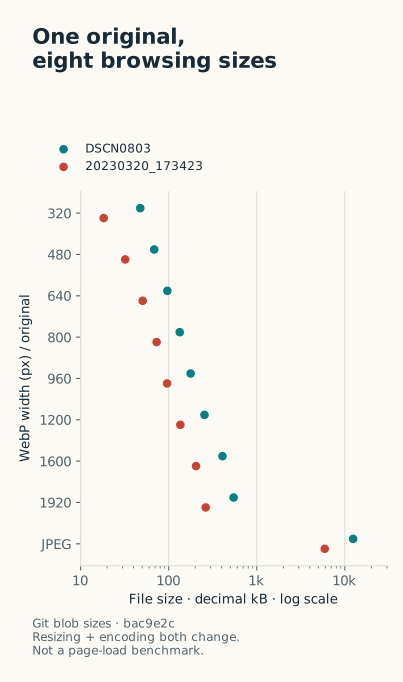
Two photographs from the December 2023 assets. The axis is logarithmic: each major step represents ten times as many bytes.
Give the browser a choice
An image displayed at 480 CSS pixels is not necessarily best served by a 480-pixel file. On a screen with a device pixel ratio of 2, the browser may use roughly twice that many image pixels to keep it sharp. That is why choosing a file from the viewport width alone can be misleading.
HTML already has a way to describe the available copies. This example uses PhotoFlare’s filename pattern:
1
2
3
4
5
6
7
8
9
10
11
12
13
14
15
<img
  src="/img/DSCN0803_960.webp"
  srcset="
    /img/DSCN0803_320.webp 320w,
    /img/DSCN0803_480.webp 480w,
    /img/DSCN0803_640.webp 640w,
    /img/DSCN0803_800.webp 800w,
    /img/DSCN0803_960.webp 960w,
    /img/DSCN0803_1200.webp 1200w,
    /img/DSCN0803_1600.webp 1600w,
    /img/DSCN0803_1920.webp 1920w"
  sizes="(min-width: 1000px) 33vw, (min-width: 600px) 50vw, 100vw"
  alt="An arched building and garden under a blue sky"
  loading="lazy"
>
srcset lists the files and their actual widths. sizes describes the space the image will occupy: approximately a third of a wide viewport, half of a medium one, or the full width on a small screen. The browser can combine that information with the display density and choose a candidate.
This is an example for a three/two/one-column layout, not a drop-in replacement for every gallery. If your tiles have padding or a fixed maximum width, adjust sizes to match. An inaccurate value can make the browser fetch a larger file than the layout needs. MDN’s responsive images guide explains the selection rules in more detail.
To check your own page, open the browser’s Network panel, filter to images, and reload at phone and desktop widths. Look at the requested filename. A small tile loading the original JPEG is an easy mistake to spot there.
Keep the download link separate
The download action should point to the original, regardless of which preview the browser selected. In PhotoFlare’s storage layout, originals and display files have separate paths, org and img. Metadata links the two:
1
2
3
4
{
  "img": "DSCN0803.jpg",
  "webp": "DSCN0803"
}
The frontend can construct a preview URL from the WebP stem and an original URL from the JPEG name. It does not need to guess the original filename from the currently displayed image.
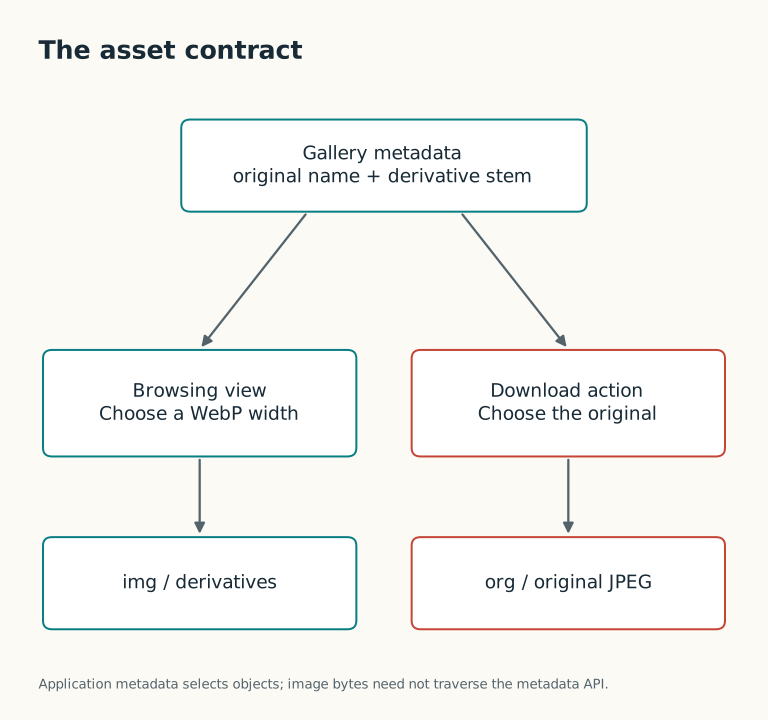
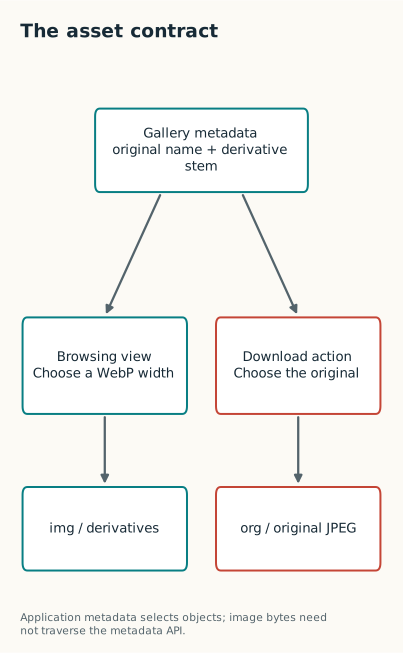
The gallery and download button use different files from the same photograph.
There is a practical release detail here, too. Generate and upload all the copies before adding the photograph to the gallery metadata. Otherwise the new entry can appear before its images are available. When replacing a photograph, regenerate its copies as well; retaining the old derivatives would make the preview disagree with the download.
For a personal gallery, this approach keeps the serving side straightforward. Conversion happens when photos are added, and visitors request files that already exist. An on-demand image service would offer more flexibility, but it would also add a service to operate. My collection is small enough that generating the copies ahead of time is easy to inspect and maintain.
The conversion script and archived assets are available in the December 2023 repository history. The PhotoFlare project post covers the rest of the Cloudflare setup.
Project work: December 2023. Written in October 2026; revised November 2026.