Why a Kafka Python client does not run unchanged in a browser
What changes when Python runs in Pyodide, how an HTTP gateway can connect it to Kafka, and the scope bug in the October adapter.
ForgeSQL has a Python worksheet inside the browser. It runs Python through Pyodide in a Web Worker, so a user can transform data without installing a local Python environment.
Kafka introduces a catch. A normal Python Kafka client expects to open a network connection to a broker. Python running in a browser cannot use that same socket API. The Python syntax can be familiar while the available networking is quite different.
The October implementation added an HTTP adapter for the worksheet. There is also a bug in that version that is useful to walk through: two unrelated objects were both called self.
The browser needs a server it can talk to
A browser can make HTTP requests and use the browser’s WebSocket API. Neither API is a general-purpose TCP connection for an unchanged Kafka client. Pyodide’s socket documentation describes this restriction for browser execution.
The adapter gives the worksheet a smaller operation: ask the application server for a bounded batch of records. The server runs the Kafka client and returns JSON to the browser.
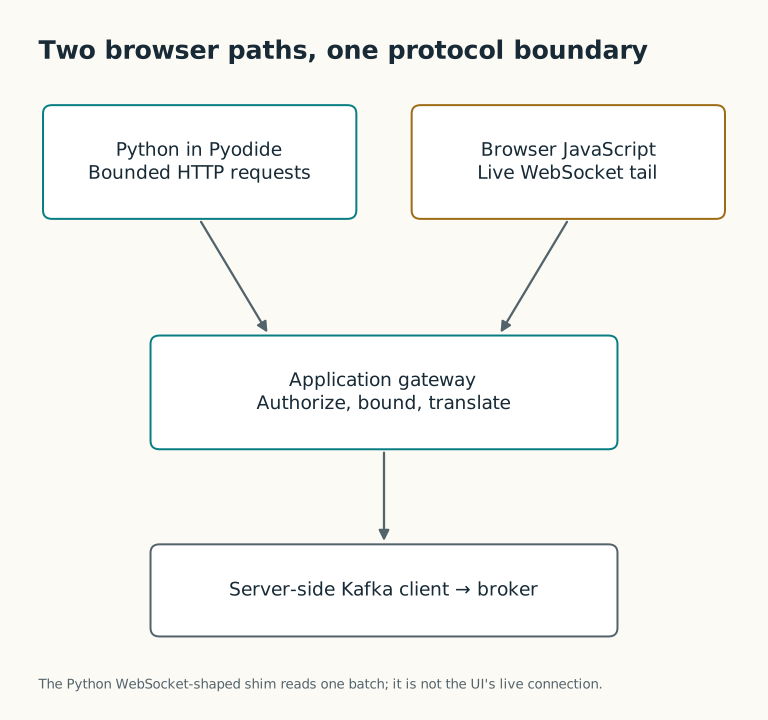
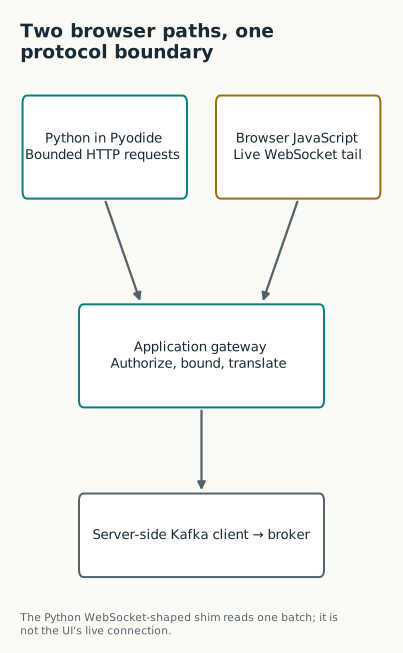
The application server owns the broker connection.
This keeps broker details out of the worksheet and gives the server a place to check access and limit results. The server must still authorize the request; a tenant name supplied by the browser is only a claim until it has been checked against a trusted identity.
What the worksheet interface looks like
The intended interface in the October worker is:
1
2
3
4
5
6
7
8
9
10
import forgesql

messages = forgesql.kafka.consume(
    "example-events",
    limit=20,
    from_beginning=False,
)

for message in messages:
    print(message.get("value"))
The adapter is supposed to turn that call into an HTTP request, then return the messages array from the response. It is a batch read, not a persistent Kafka consumer. The archived implementation needs the scope correction below before that example can work.
The worker uses synchronous XMLHttpRequest. Running it in a Web Worker keeps the request off the page’s main thread, but the Python worker still waits for the response. A slow backend can therefore hold up the worksheet even though the rest of the interface remains responsive.
The self bug
The injected Python starts with this import:
1
from js import XMLHttpRequest, self
Here, self is the browser worker’s global object. At module level, self.location.origin gives the application’s origin.
But the adapter is a Python class. Inside a method declared as consume(self, ...), the name self means the class instance:
1
2
3
class _KafkaBridge:
    def consume(self, topic, limit=50, from_beginning=True):
        target_url = self.location.origin + "/api/kafka/topics/"
The instance has no location attribute, so this fails before it opens a request:
1
AttributeError: '_KafkaBridge' object has no attribute 'location'
An isolated call with a dummy request object reproduces that failure without a browser or broker. The problem is ordinary Python name lookup, rather than Kafka or WebAssembly.
A distinct name for the browser object makes the intended access clear:
1
2
3
4
5
6
7
8
9
10
11
12
13
14
from js import self as worker_scope

class KafkaBridge:
    def __init__(self):
        self.origin = str(worker_scope.location.origin)

    def topic_url(self, topic):
        from urllib.parse import quote
        return (
            self.origin
            + "/api/kafka/topics/"
            + quote(topic, safe="")
            + "/messages"
        )
This is a proposed correction to URL construction, not a replacement for the whole adapter. Quoting the topic as one path component also prevents a slash in the input from changing the URL structure. Passing the origin into the constructor would make this code easier to test outside the browser.
Request identity needs the same attention. Reading tenant context from the Python instance does not retrieve properties from the worker global. Fixing location alone does not fix every use of the confused self name.
A batch read and a live tail need different behavior
ForgeSQL’s JavaScript interface has a separate WebSocket path for watching new messages. That path keeps a connection open. The worksheet’s HTTP adapter fetches a finite result and returns.
The worker also includes a class shaped like websocket.WebSocketApp, but its run_forever() method reads one batch through the HTTP adapter and closes. The name suggests more than the implementation does. If an example uses it, that limitation needs to be stated where the example is shown.
For a worksheet, an explicit batch method is easier to understand. Someone who wants to inspect twenty records can do so without having to manage a long-lived connection. Someone who wants a live feed needs reconnection, cancellation, and a rule for how much unread data can accumulate.
I would test the adapter with a fake HTTP response before involving Kafka: check topic encoding, the result limit, non-success responses, and cancellation of a slow request. Then test the server against disposable topics. Publishing deserves a separate test because a timeout after sending a message does not prove that the broker rejected it; automatically rerunning a write can create duplicates.
The bridge is useful, but the runtime difference should stay visible in its API. A small, documented read operation is easier to support than a familiar package name whose behavior has quietly changed.
Project work: October 2026, commit 5ea1507. Written in October; revised November 2026. The constructor example is a suggested correction to that version.