Adding a stale-reading warning to an ESP8266 dashboard
Why an MQTT connection can stay green after a sensor stops, and how to show the age of a reading with two small Node-RED functions.
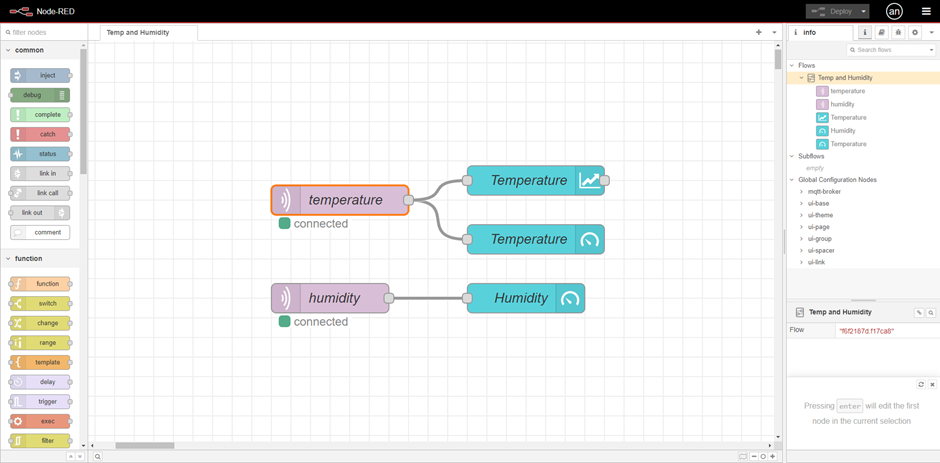
My temperature monitor uses an ESP8266, a DHT22 sensor, MQTT, and Node-RED. The device sends temperature and humidity every ten seconds, and Node-RED puts the values on a dashboard. The original setup guide explains the wiring and the flow.
There is a small improvement worth making before relying on a dashboard like this: show when its last reading arrived. If the ESP8266 loses power, the old temperature can remain on the gauge. A plausible number such as 24.6°C gives you no way to tell that the device stopped reporting.
You can fix most of that problem in Node-RED without changing the firmware. The functions below are an extension to the original flow.
Why the green connection indicator is not enough
The MQTT input in Node-RED connects to the broker. The ESP8266 connects to that broker separately. If the device goes offline while the broker stays running, Node-RED can remain connected. Its green indicator does not tell you whether the sensor is still sending measurements.
The firmware checks its connections before publishing. When it is disconnected, it skips that reading. It does not save a backlog to upload later. It also skips invalid DHT readings, so a sensor problem can leave the dashboard waiting even when the device has Wi-Fi.
That is why I want to time the last valid reading, rather than just monitor connection state.
Save the arrival time with the value
Add a Function node after the temperature MQTT input. MQTT payloads can arrive as strings, so convert the payload to a number and reject an invalid or empty value before saving it:
1
2
3
4
5
6
7
8
9
10
11
12
13
14
const raw = String(msg.payload).trim();
const value = Number(raw);

if (raw === '' || !Number.isFinite(value)) {
    return null;
}

flow.set('lastTemperature', {
    value: value,
    receivedAt: Date.now()
});

msg.payload = value;
return msg;
Connect this node to the existing temperature gauge. The gauge still receives a number. The extra record lives in flow context, where another node on the same flow tab can read it.
receivedAt is the time Node-RED accepted the message. It is not the time the DHT22 took the measurement. For detecting a device that has gone quiet, arrival time is a useful first step and avoids needing a synchronized clock on the ESP8266.
Check even when no messages arrive
A freshness check that runs only when an MQTT message arrives has a flaw: when the sensor stops, the check stops too.
Add an Inject node that fires every five seconds, connected to a second Function node. Send its output to a text or status widget, rather than the numeric gauge:
1
2
3
4
5
6
7
8
9
10
11
12
13
14
15
16
const sample = flow.get('lastTemperature');

if (!sample) {
    msg.payload = 'Waiting for the first reading';
    return msg;
}

const ageSeconds = Math.floor(
    (Date.now() - sample.receivedAt) / 1000
);

msg.payload = ageSeconds >= 30
    ? `Stale: last reading ${ageSeconds}s ago`
    : `Updated ${ageSeconds}s ago`;

return msg;
With a ten-second reporting interval, thirty seconds is a reasonable starting threshold: it allows a couple of missed updates before warning. Change it to suit the device and network. The five-second Inject interval means the warning can appear a few seconds after the threshold is crossed.
Both Function nodes must use the same flow tab and context key. After a restart, the status may return to “waiting,” depending on your context-storage configuration. That is preferable to making an old number look newly measured.
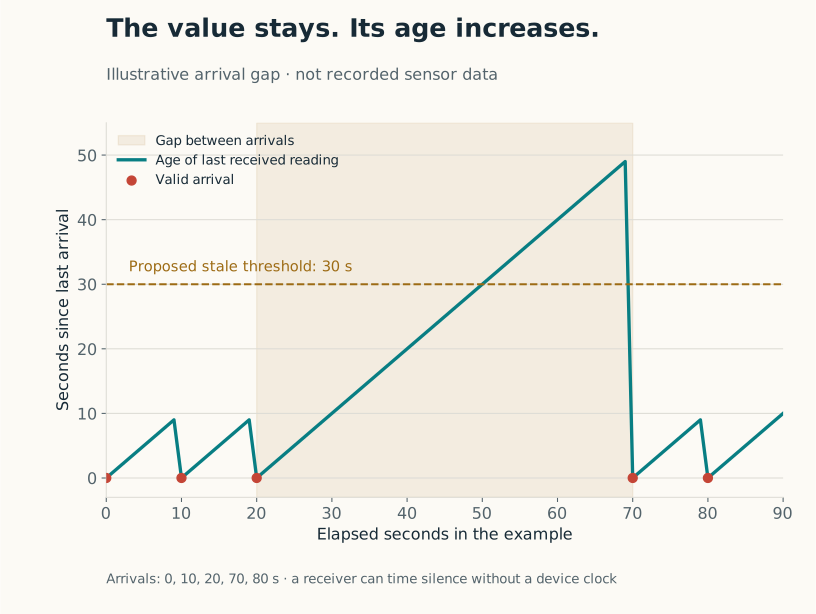
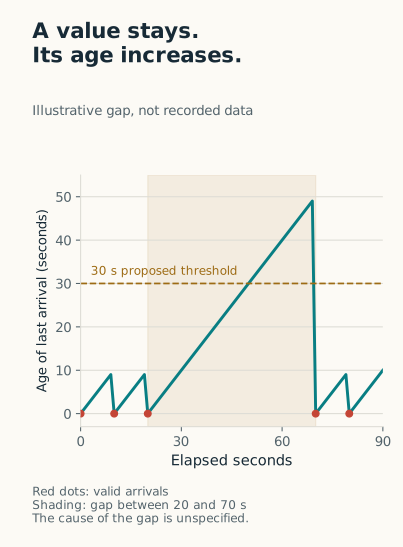
Example arrivals at 0, 10, 20, 70, and 80 seconds. This is a constructed example, not a recording from the sensor.
The gauge can keep showing the last value while the adjacent text says it is stale. Avoid replacing a missing temperature with zero; zero is a real temperature and would look like a new measurement.
Would changing MQTT QoS solve this?
The original firmware publishes with QoS 0 and the retained flag disabled:
1
mqttClient.publish(topic, 0, false, payload.c_str());
QoS 0 does not acknowledge delivery. Node-RED requesting QoS 1 cannot recover a message that never reached the broker. Retaining a value can help a new subscriber receive the last published value, but it does not make that value recent. These details are described in the MQTT specification.
For this monitor, I would add the age indicator before changing transport settings. It addresses the question someone looking at the page actually has: is this a recent reading?
To try the change, leave the broker and Node-RED running, then switch off the ESP8266. The status should become stale after about thirty seconds while the gauge retains its old number. Power the device back on and confirm that a valid new reading clears the warning. Also test an empty payload and a non-numeric one; neither should reset the timer.
Temperature and humidity currently arrive on separate topics. Give humidity its own saved value and timestamp if you want the same warning there. A temperature arrival should not refresh the age of a humidity reading that never arrived.
Project work: June 2025. These Node-RED additions were written for this November 2026 revision.