Building PhotoFlare: An Edge-First Static Gallery with Cloudflare & Angular
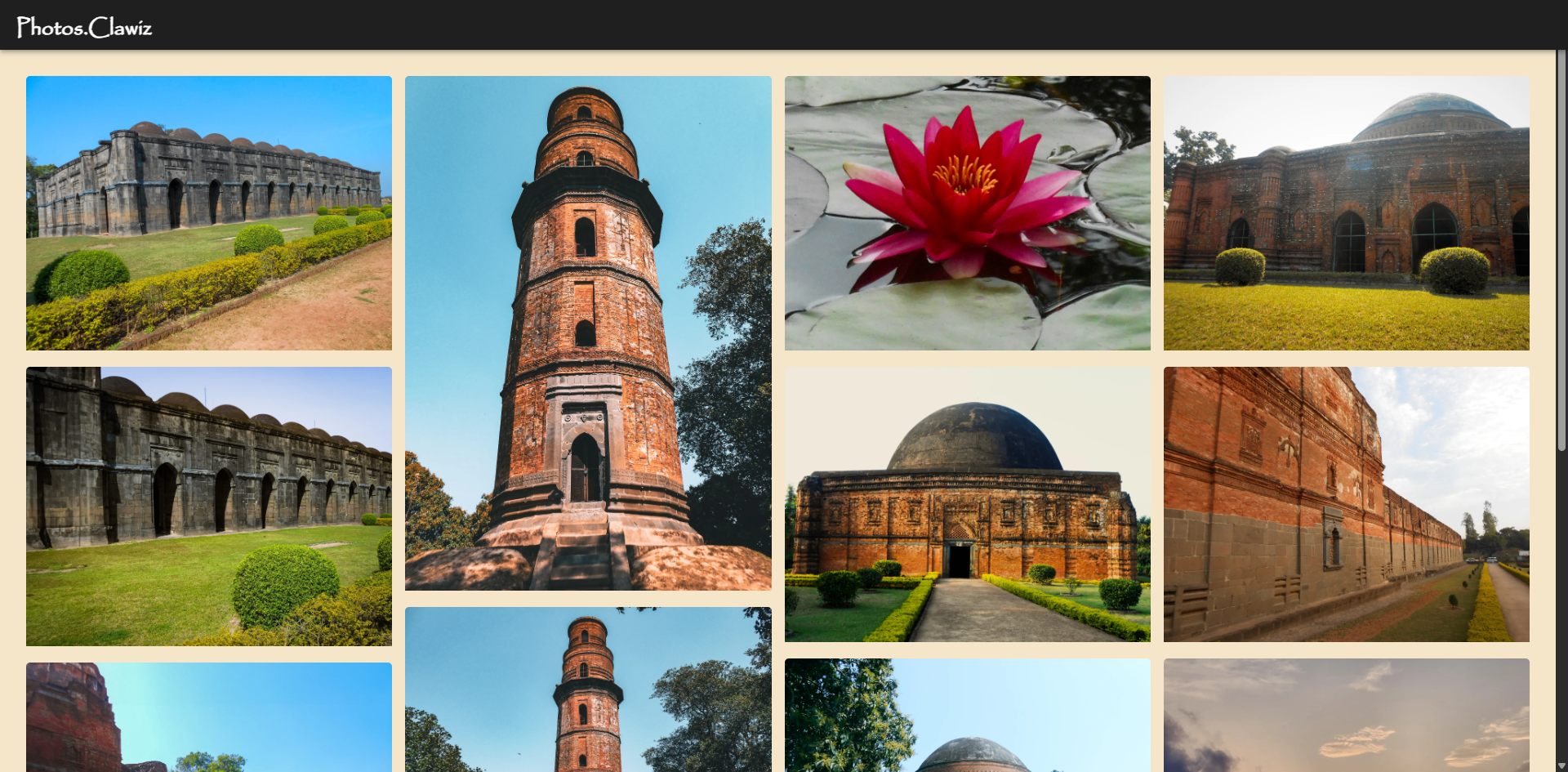
🧾 Overview
A breakdown of how I built a high-performance image gallery using Cloudflare Pages, Workers, KV Storage, R2, and Angular—no traditional backend, just edge-native tech.
Key Features:
- WebP images for fast loading: The gallery automatically serves optimized WebP images based on your device and browser support.
- Download highest quality: Users can download the original, highest-quality version of any photo.
- Instagram integration: Clicking any image opens the corresponding Instagram post in a new tab.
✨ What is PhotoFlare?
PhotoFlare is a fully static yet dynamic-feeling photo gallery served entirely through Cloudflare’s edge infrastructure. The stack uses Angular for the frontend, Cloudflare Pages for static hosting, R2 for object storage, KV for metadata, and Workers for edge routing. CI/CD is handled through GitHub Actions.
❔ Why PhotoFlare?
I wanted to:
- Serve a sleek image gallery without relying on any centralized backend.
- Push the boundaries of what static websites can do with edge computing.
- Learn and demonstrate how Cloudflare’s ecosystem can replace a full-stack setup.
🤖 Core Architecture
Here’s a high-level view of how all the pieces fit:
flowchart TD
    subgraph Edge
        Worker[Cloudflare Worker]
        KV[KV Store - Image Metadata]
        R2[R2 Bucket - Image Objects]
    end
    subgraph Static Hosting
        Pages[Angular App - Cloudflare Pages]
    end
    Client([Client - Browser])

    Client <--> Worker
    Worker --> KV
    Worker --> R2
    Client --> Pages
🚀 Key Technologies
| Purpose | Tech Stack |
|---|---|
| Frontend UI | Angular |
| Static Hosting | Cloudflare Pages |
| Image Metadata | Cloudflare KV Store |
| Image Storage | Cloudflare R2 |
| Edge Logic | Cloudflare Workers |
| CI/CD | GitHub Actions |
🌟 Feature Highlights
1. Static Yet Dynamic
- Workers intercept routes
- Metadata fetched from KV
- Images lazy-loaded from R2
2. Image Metadata in KV
1
2
3
4
5
6
7
8
9
10
11
12
13
14
15
16
17
18
19
20
21
[
  {
    "description": "Immersing in centuries-old craftsmanship that echoes India\'s cultural tapestry. Every angle tells a tale, each stone holds history\'s secrets.",
    "instagramPostUrl": "https://www.instagram.com/p/C0w4jroor4K/?utm_source=ig_web_copy_link&igshid=ZWQ3ODFjY2VlOQ==",
    "date": "2023-12-13",
    "images": [
      { "img": "DSCN0803.jpg", "webp": "DSCN0803" },
      { "img": "DSCN0805.jpg", "webp": "DSCN0805" },
      { "img": "DSCN0809.jpg", "webp": "DSCN0809" }
    ]
  },
  {
    "description": "Timeless beauty in brick and mortar: Captured the Firoz Minar, its intricate details and towering height a testament to history grandeur.",
    "instagramPostUrl": "https://www.instagram.com/p/C0uUZhKSv6m/?utm_source=ig_web_copy_link&igshid=ZWQ3ODFjY2VlOQ==",
    "date": "2023-12-12",
    "images": [
      { "img": "DSCN0814.jpg", "webp": "DSCN0814" },
      { "img": "DSCN0816.jpg", "webp": "DSCN0816" }
    ]
  }
]
3. Images Served from R2
- Uploaded via Wrangler CLI
- Served over public binding with lazy loading
4. CI/CD with GitHub Actions
- Angular → Pages
- Worker → via Wrangler
- Secrets managed in GitHub Settings
5. URL Routing with Workers
Handles /docs, fetches metadata, rewrites image URLs.
🗝️ Setting Up Cloudflare KV for Photo Metadata
To make the Worker code work, you need to create a Cloudflare KV namespace and add a key called photos containing your gallery metadata.
1. Create a KV Namespace
You can create a KV namespace via the Cloudflare dashboard or using Wrangler CLI:
1
wrangler kv:namespace create "PHOTOFLARE"
2. Add the photos Key
You can add the photos key and its value using the Wrangler CLI or UI:
1
2
3
4
5
6
7
8
9
10
11
12
13
14
15
16
17
18
19
20
21
22
23
24
25
26
27
28
29
30
31
32
33
34
35
36
37
38
39
40
41
42
43
44
45
46
47
48
49
50
51
52
53
54
55
wrangler kv:key put --binding=PHOTOFLARE photos '[
  {
    "description": "Immersing in centuries-old craftsmanship that echoes India\'s cultural tapestry. Every angle tells a tale, each stone holds history\'s secrets.",
    "instagramPostUrl": "https://www.instagram.com/p/C0w4jroor4K/?utm_source=ig_web_copy_link&igshid=ZWQ3ODFjY2VlOQ==",
    "date": "2023-12-13",
    "images": [
      { "img": "DSCN0803.jpg", "webp": "DSCN0803" },
      { "img": "DSCN0805.jpg", "webp": "DSCN0805" },
      { "img": "DSCN0809.jpg", "webp": "DSCN0809" }
    ]
  },
  {
    "description": "Timeless beauty in brick and mortar: Captured the Firoz Minar, its intricate details and towering height a testament to history grandeur.",
    "instagramPostUrl": "https://www.instagram.com/p/C0uUZhKSv6m/?utm_source=ig_web_copy_link&igshid=ZWQ3ODFjY2VlOQ==",
    "date": "2023-12-12",
    "images": [
      { "img": "DSCN0814.jpg", "webp": "DSCN0814" },
      { "img": "DSCN0816.jpg", "webp": "DSCN0816" }
    ]
  },
  {
    "description": "As graceful as a ballerina, this water lily dances on the surface of the pond",
    "instagramPostUrl": "https://www.instagram.com/p/Crl6g5nI3gg/?utm_source=ig_web_copy_link&igshid=ZWQ3ODFjY2VlOQ==",
    "date": "2023-04-29",
    "images": [
      { "img": "RSCN1296.jpg", "webp": "RSCN1296" }
    ]
  },
  {
    "description": "The beauty of history never fades",
    "instagramPostUrl": "https://www.instagram.com/p/Cq6QAfwye1T/?utm_source=ig_web_copy_link&igshid=ZWQ3ODFjY2VlOQ==",
    "date": "2023-04-12",
    "images": [
      { "img": "DSCN0823.jpg", "webp": "DSCN0823" },
      { "img": "DSCN0820.jpg", "webp": "DSCN0820" },
      { "img": "DSCN0819.jpg", "webp": "DSCN0819" }
    ]
  },
  {
    "description": "Stepping back in time and admiring the beauty of historic architecture 🏛️🌿",
    "instagramPostUrl": "https://www.instagram.com/p/CqgMRApPRhu/?utm_source=ig_web_copy_link&igshid=ZWQ3ODFjY2VlOQ==",
    "date": "2023-04-01",
    "images": [
      { "img": "DSCN0828.jpg", "webp": "DSCN0828" }
    ]
  },
  {
    "description": "The beach, the clouds, and the golden hour ✨",
    "instagramPostUrl": "https://www.instagram.com/p/CqQ3Zo8PakT/?utm_source=ig_web_copy_link&igshid=ZWQ3ODFjY2VlOQ==",
    "date": "2023-03-27",
    "images": [
      { "img": "20230320_173423.jpg", "webp": "20230320_173423" }
    ]
  }
]'
Tip:
If your JSON is large, you can save it to a file (e.g.,photos.json) and run:
wrangler kv:key put --binding=PHOTOFLARE photos --path=photos.json
Now your Worker can fetch the photo metadata using
let value = await env.PHOTOFLARE.get("photos");
🛠️ Cloudflare Worker Code
Note:
To avoid CORS errors, make sure you define the routepixels.clawiz.com/docs/*in your Cloudflare Worker settings (either in yourwrangler.tomlor via the Cloudflare dashboard).
This ensures your Worker is invoked for all requests to/docs/*and can set the correct CORS headers for your Angular gallery.
Here’s the Worker code I used to fetch photo metadata from KV and handle CORS for the gallery API:
1
2
3
4
5
6
7
8
9
10
11
12
13
14
15
16
17
18
19
20
21
22
23
24
25
26
27
28
29
export default {
  async fetch(request, env, ctx) {
    try {
      // Get the value from Cloudflare KV
      let value = await env.PHOTOFLARE.get("photos");

      // Set CORS headers
      const allowedOrigins = ["http://localhost:8100", "https://pixels.clawiz.com"];
      const origin = request.headers.get("Origin");

      const headers = new Headers({
        "Access-Control-Allow-Origin": origin,
        "Access-Control-Allow-Methods": "GET, OPTIONS",
        "Access-Control-Allow-Headers": "Origin, X-Requested-With, Content-Type, Accept",
      });

      // Create a response with the value and CORS headers
      return new Response(value, {
        headers,
      });

    } catch (error) {
      console.error('Error fetching from Cloudflare KV:', error);

      // Respond with a generic error message
      return new Response('Internal Server Error', { status: 500 });
    }
  },
};
⚙️ Angular Production Environment Setup
To ensure your Angular frontend loads images and gallery data from the correct locations in production, configure the following variables in your environment file.
File: src/environments/environment.prod.ts
1
2
3
4
5
6
7
export const environment = {
  production: true,
  bucketURL: 'https://ghtdptywfh9hhcbe.clawiz.com', // Cloudflare R2 public bucket URL
  rawImagePath: 'org',      // Folder for original images
  webpImagePath: 'img',     // Folder for webp images
  dataURL: '/docs/'         // API route served by your Cloudflare Worker
};
🔧 Developer Setup
1
2
3
4
5
### Clone & Install
git clone https://github.com/Ankitd013/PhotoFlare.git
cd PhotoFlare/angular-app
npm install
ng serve
🏃♂️Run Worker Locally
1
2
3
npm install -g wrangler
cd ../worker
wrangler dev
❌ Challenges Faced
- R2 CORS headers → handled via Worker
- KV value size → optimized schema
- Angular routes →
_routes.jsonhandling - Local emulation of KV/R2 → mocks
📈 Results
- ⚡ Sub-100ms KV lookups
- 🖼️ Seamless R2 image loads
- 🚀 Fully serverless and scalable architecture
🤔 Why This Matters
PhotoFlare shows how you can use Cloudflare’s edge stack to build something dynamic and complex with no server in sight. And that Angular is just as relevant as React when combined with the right infrastructure.
📲 Try it Yourself
Thanks for reading. 🚀